
Recorded course · Lifetime access
Microsoft Office Mastery: Excel, Word & PowerPoint with Copilot (Recorded)
▶
HD video lessons
☰
Structured chapters
★
Free free previews
🎓
Certificate on completion
Excel LogicsPractical computer training · Hyderabad, since 2016
 ▶ Watch a free lesson
<p><strong>Master the three Microsoft Office apps every employer expects, in one program.</strong></p>
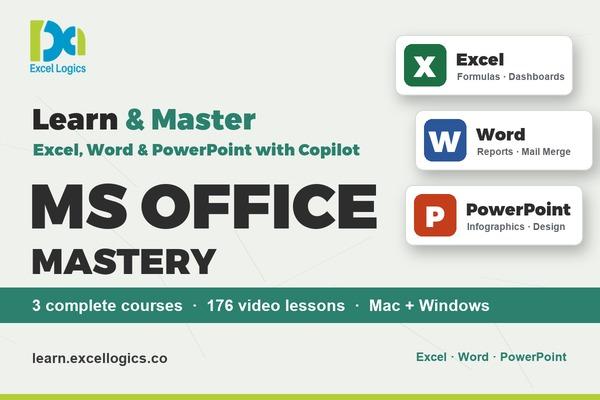
<p>Microsoft Office Mastery brings together our three complete recorded courses. You get lifetime access to all of them, with one enrolment and one dashboard.</p>
<h3>What's included</h3>
<ul>
<li><strong>Microsoft Excel - Beginner to Advanced</strong>: formulas and functions, lookups, pivot tables, charts and dashboards for real office work.</li>
<li><strong>Microsoft Word - Beginner to Advanced with Copilot</strong>: 56 classes covering formatting, styles, long reports with a contents page, mail merge, Track Changes, forms and Copilot.</li>
<li><strong>Microsoft PowerPoint - Beginner to Advanced with Copilot</strong>: 79 classes and a 12-part real-time project covering slide design, 13 infographics, animations, Morph, business decks and Copilot.</li>
</ul>
<h3>Why take all three</h3>
<p>Most office work moves between these three apps: the numbers come from Excel, the report is written in Word, and the results are presented in PowerPoint. Learning them together means you can do the whole job yourself, from data to document to presentation.</p>
<p>Every class is shown step by step on screen with captions, zoom-ins on every click and chapter timestamps. Every shortcut is shown for <strong>both Mac and Windows</strong>. The Word and PowerPoint courses include practice files, quizzes and activities after every class, and each course gives its own certificate on completion.</p>
<h3>What you'll learn</h3>
<ul>
<li>Build Excel sheets with formulas, lookups, pivot tables, charts and dashboards</li>
<li>Create professional Word documents, long reports with a contents page, mail merge letters and forms</li>
<li>Design PowerPoint slides, infographics, animations and complete business decks</li>
<li>Use Copilot in Word and PowerPoint to draft, rewrite and design faster</li>
<li>Work faster with keyboard shortcuts on both Mac and Windows</li>
<li>Finish real office tasks from start to finish with practice files and activities</li>
</ul>
<h3>Who this program is for</h3>
<ul>
<li>Students and freshers preparing for office and corporate jobs</li>
<li>Working professionals in admin, HR, accounts, sales and operations</li>
<li>Anyone who wants to be confident with the full Microsoft Office toolkit</li>
</ul>
<h3>Requirements</h3>
<ul>
<li>A laptop or PC with Microsoft Office (2016 or later, or Microsoft 365), Mac or Windows</li>
<li>Copilot lessons need a Microsoft 365 plan that includes Copilot; everything else works without it</li>
<li>No prior experience needed</li>
</ul>
<h3>Frequently asked questions</h3>
<p><strong>What do I get in this bundle?</strong> Lifetime access to three complete recorded courses: Microsoft Excel, Microsoft Word with Copilot and Microsoft PowerPoint with Copilot, all in one dashboard.</p>
<p><strong>Do I get a certificate?</strong> Yes. You get a separate Excel Logics certificate for each course when you complete it, so three certificates in total.</p>
<p><strong>I use a Mac. Will this work for me?</strong> Yes. Every shortcut is shown for both Mac and Windows, and the lessons point out where the two versions differ.</p>
<p><strong>Do I need Copilot?</strong> No. Copilot lessons are a small part of the Word and PowerPoint courses. Everything else works with Office 2016 or later and Microsoft 365.</p>
<p><strong>How long do I have access?</strong> Lifetime access on the Excel Logics app (Android and iOS) and on the web.</p>
Since 2016Training in Hyderabad
15,000+Learners trained
Mac + WindowsShortcuts in every class
LifetimeAccess on app & web
What you'll learn
Skills you'll use at work
Bundle curriculum
What's inside the bundle
Loading curriculum…
About this course
Course overview
Who this course is for
Requirements
About Excel Logics
Practical training since 2016
Excel Logics, Hyderabad
15,000+ learners trained since 2016
Microsoft Office Mastery brings our three complete Office courses together in one program. Every course follows the same practical style as our classroom training: every feature is shown step by step on screen, every shortcut is shown for Mac and Windows, and every class ends with activities you can try yourself. You get a separate certificate for each course you complete.
Microsoft ExcelMicrosoft WordMicrosoft PowerPointCopilotMac + Windows
FAQ
Frequently asked questions
Start learning today
Watch the free lessons first, then enroll when you're ready.
Start today
Ready to master Microsoft Office & AI?
Watch the free lessons, then learn at your own pace with lifetime access.
Lifetime accessLearn at your own pace
App & webAndroid, iOS and browser
CertificateOn course completion
Secure paymentsInstant course access
Practical Excel, VBA, Word, PowerPoint and ChatGPT training from Hyderabad since 2016. Recorded courses on the Excel Logics app and live online batches.
Since 201615,000+ learnersMicrosoft Certified Excel Expert
Follow us